
Whether you’re trying to get some work done at a local coffee shop or you’re sharing your phone’s data with a tablet in the backseat of a car, choosing the right frequency for your mobile hotspot is the difference between a seamless connection and total frustration. If you want the quick answer: 5 GHz is better for raw speed and low latency in close quarters, while 2.4 GHz is superior for range and connecting through walls.
Why Does Hotspot Frequency Even Matter?
When you toggle that "Personal Hotspot" switch on your iPhone or Android device, you aren't just sending out a generic signal. You’re essentially turning your phone into a mini router. Just like the router in your living room, your phone broadcasts on specific radio frequency bands.
The 2.4 GHz band has been the workhorse of wireless communication for decades. It uses longer waves, which are great at traveling long distances and passing through solid objects like plywood, drywall, or even your car seat. On the flip side, the 5 GHz band is the modern speedster.
It uses shorter waves that carry more data but struggle to move through physical obstacles.
Choosing between them isn't about which one is "best" in a vacuum; it’s about matching the tool to your current environment. If I’m sitting in a crowded airport, my choice is going to be very different than if I’m at a remote campsite. We’ve come a long way since the early days of mobile connectivity, and having this level of control over our pocketsized networks is a luxury we often take for granted.
The Key Differences Between 2.4 GHz and 5 GHz
To understand which one to pick, we need to look at the physics of the signal. Radio waves are a bit like sound. Think of 2.4 GHz as a deep, bassy drum beat, it carries through walls and travels far.
Think of 5 GHz as a high-pitched whistle, it’s very clear and fast, but it’s easily muffled by a hand or a closed door.
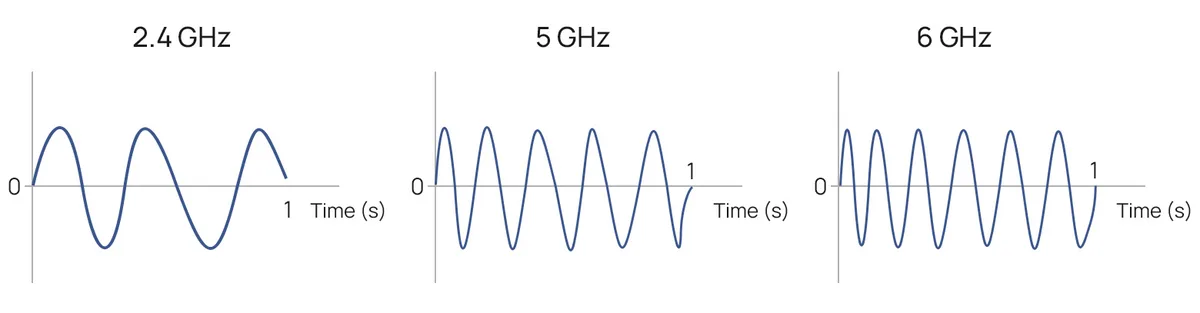
Image source: Web (Bing) / marketing.bspabar.com (Web image (fair-use with source credit))
Speed and Performance
The most noticeable difference is how fast your pages load. 5 GHz can handle significantly higher throughput. If you have a 5G cellular connection, using a 5 GHz hotspot ensures that the bottleneck isn't the Wi-Fi link between your phone and your laptop. In contrast, 2.4 GHz is often capped at lower speeds, which might make even a fast cellular connection feel sluggish.
Interference and Congestion
This is where 2.4 GHz usually fails in modern settings. Because 2.4 GHz only has three non-overlapping channels, it gets crowded fast. Your Bluetooth headphones, your neighbor's microwave, baby monitors, and dozens of other hotspots all live in this space.
According to the IEEE Standards Association, managing this congestion is a primary driver for moving toward higher frequency bands like 5 GHz and 6 GHz. When everyone is shouting in the same small room, nobody can be heard. 5 GHz offers many more channels, meaning you're less likely to deal with "lag spikes" caused by other electronics.
Comparing the Two Bands at a Glance
| Feature | 2.4 GHz Hotspot | 5 GHz Hotspot |
|---|---|---|
| Max Speed | Lower (approx. 150-450 Mbps) | Much Higher (up to 1 Gbps+) |
| Range | Excellent (long distances) | Shorter (limited reach) |
| Obstacle Penetration | Strong (goes through walls) | Weak (blocked by walls/bodies) |
| Interference | High (Microwaves, Bluetooth) | Low (Cleaner signal) |
| Battery Drain | Moderate | Slightly Higher |
| Compatibility | Works with all devices | Requires modern hardware |
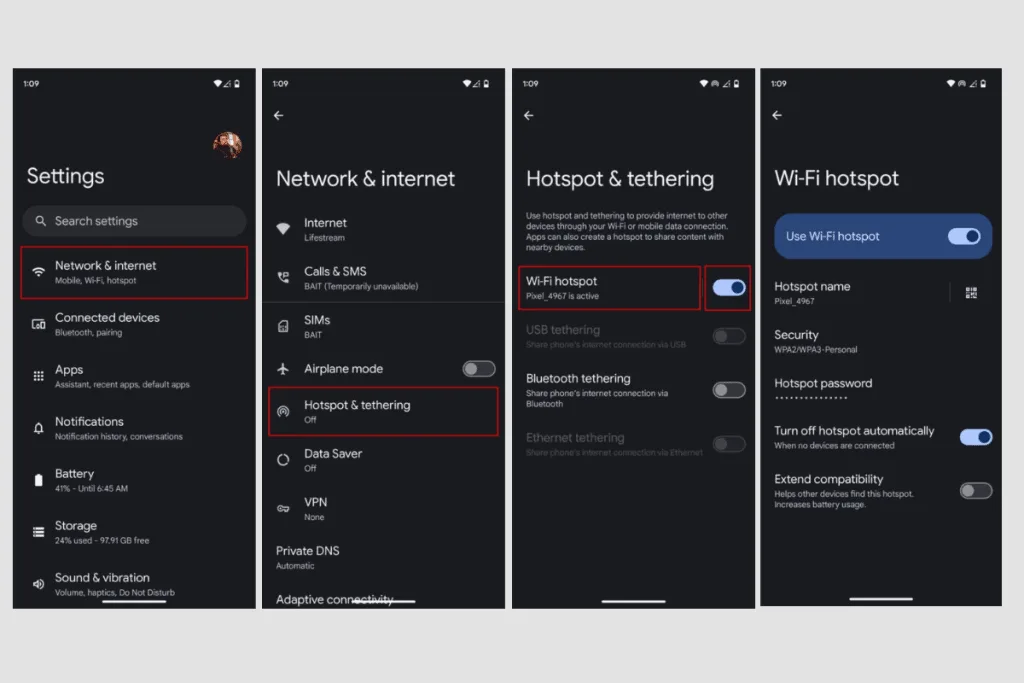
Image source: Bing (Web (fair-use with source credit))
When Should I Use 2.4 GHz for My Hotspot?
There are specific times when I intentionally throttle myself back to the 2.4 GHz band. It isn't "old" tech; it's specialized tech.
- Distance is a Factor: If you leave your phone charging on the dashboard of your truck while you work on a laptop at a picnic table 30 feet away, 5 GHz will likely drop the connection. 2.4 GHz will hold steady.
- Connecting Older Gear: If you’re trying to get an older e-reader or a cheap Wi-Fi camera online, they might not even "see" a 5 GHz network. I’ve seen this happen often when people try to bridge older hardware generations with modern smartphones.
- Physical Obstructions: If your phone is in your pocket and you’re using a tablet, your own body can actually dampen a 5 GHz signal. 2.4 GHz passes through you with much less resistance.
- Battery Conservation: Generally speaking, broadcasting at 2.4 GHz requires slightly less processing power and energy than the high-frequency 5 GHz band. If you’re at 10% battery and need to send one last email, switch to 2.4 GHz.
When Should I Use 5 GHz for My Hotspot?
If you are within ten feet of your phone and there is a clear line of sight, 5 GHz is almost always the superior choice.
- High-Bandwidth Tasks: If you are downloading large files, streaming 4K video, or jumping on a Zoom call, 5 GHz is a must. The lower latency (ping) makes the connection feel "snappy," similar to a home fiber connection.
- Public Places: In a mall, an office, or a dense apartment complex, the 2.4 GHz band is likely screaming with interference. Moving to 5 GHz is like moving from a traffic-jammed side street to a wide-open highway.
- Gaming: If you’re using your hotspot for mobile gaming, 2.4 GHz will drive you crazy with jitter. The stability of the 5 GHz band, provided you stay close to the phone, is night and day.
We’ve seen massive jumps in speed over the last decade, and 5 GHz is the band that actually lets you utilize the power of modern 5G cellular networks.
My Personal Experience: The "Backseat" Test
I remember a road trip where I was trying to get some work done on my laptop while my spouse drove. I had my phone in the center console and my laptop on my knees in the passenger seat. I had the hotspot set to 5 GHz, thinking I wanted the best speed.
However, every time I leaned forward or shifted my bag, the connection would stutter.
I realized that the physical interference of the car seats and my own movements were clipping the 5 GHz waves. I swapped the settings to 2.4 GHz. The speed test showed a lower number, but the stability was perfect.
The pages stopped hanging, and the connection stayed solid for the rest of the three-hour drive.
Conversely, when I’m at a hotel with terrible Wi-Fi, I put my phone right next to my laptop on the desk and blast 5 GHz. Even though the room is surrounded by other people’s signals, the 5 GHz band cuts through the noise because there are so many channels available. It's all about how you apply the technology to your specific situation.
How to Switch Your Hotspot Band
Most modern smartphones allow you to choose your band, though they might hide the setting under different names.
On Android:
- Open Settings and go to Network & Internet.
- Tap on Hotspot & Tethering > Wi-Fi Hotspot.
- Look for AP Band or Select Band.
- Choose between 2.4 GHz and 5.0 GHz Preferred.
On iPhone:
Apple keeps it simpler but less descriptive.
- Go to Settings > Personal Hotspot.
- You will see a toggle for Maximize Compatibility.
- Off: The phone will use 5 GHz (if supported by the device).
- On: The phone switches to 2.4 GHz to ensure older devices can connect.
Troubleshooting Common Hotspot Issues
If you’ve picked a band but things still aren't working, here are a few things I always check:
- Check Your Data Plan: Sometimes the "lag" isn't the Wi-Fi band at all; it’s your carrier throttling your hotspot data after you've hit a certain limit.
- Heat Management: Running a 5 GHz hotspot while charging and using GPS will make your phone incredibly hot. When phones overheat, they throttle their processors, which kills your internet speed. If your phone feels like a hot pocket, switch to 2.4 GHz or take it out of its case.
- Device Limits: Most phones have a limit on how many devices can connect at once. If you’re at a tailgating party and everyone is trying to link up, 2.4 GHz might actually handle the "handshake" of multiple devices better, even if the individual speeds are lower.
The evolution of these standards is fascinating, especially when you compare how we connected in the 90s to the seamless high-speed handoffs we have today.
Frequently Asked Questions
Does 5 GHz use more phone battery?
Yes, typically. It requires more power to broadcast higher frequency waves and process the higher data throughput. However, the difference is often negligible unless you are doing heavy downloading for hours.
Can I use both 2.4 GHz and 5 GHz at the same time on a hotspot?
Most smartphones can only broadcast on one band at a time for a hotspot. When you select one, the other shuts off. Some high-end dedicated mobile routers (like Netgear Nighthawks) can do dual-band, but your average iPhone or Galaxy cannot.
Why can't my laptop see my 5 GHz hotspot?
Your laptop’s wireless card might be older and only compatible with 802.11n (2.4 GHz). If your device doesn't support the 5 GHz frequency, the network name simply won't appear in your list of available connections.
Is 5 GHz safer than 2.4 GHz?
In terms of data security, both use the same WPA2 or WPA3 encryption protocols. In terms of "health," both are non-ionizing radiation and are considered safe by agencies like the Federal Communications Commission. 5 GHz actually has a harder time penetrating human skin than 2.4 GHz does.
Which band is better for 5G phones?
If you have a 5G cellular signal, you should almost always use the 5 GHz hotspot band. The 2.4 GHz Wi-Fi band is often slower than the 5G cellular speed coming into your phone, meaning you’d be wasting that fast cellular connection.
Making the Final Call
In the grand scheme of technological progress, having the ability to choose your frequency is a small but mighty tool. If you are sitting right next to your phone and want to get work done quickly, flip it to 5 GHz. You’ll appreciate the snappiness and the lack of interference from the world around you.
However, if you’re moving around, trying to save a bit of battery, or connecting an older gadget that’s seen better days, stick with 2.4 GHz. It’s the reliable old friend that doesn't mind a few walls or a bit of distance.
There is no "wrong" choice here, only the choice that fits your current environment. The next time you're struggling with a spotty connection, take five seconds to dive into your settings and swap the band, it’s often the only "fix" you actually need. Enjoy the freedom of staying connected, wherever your travels take you!

I’m the tech enthusiast behind FixTechEasy. I know how stressful it is when your technology doesn’t cooperate. My goal here is to take the headache out of troubleshooting by breaking down complex tech problems into simple, easy-to-follow steps. From quick fixes to deep-dive guides, I’m here to help you get back to what matters most. Let’s get your tech working for you, not against you.
3 thoughts on “2.4 GHz vs 5ghz Hotspot Which Is Better”